About Timestamp Camera Enterprise
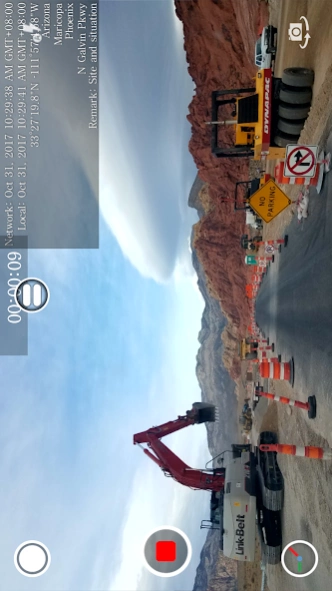
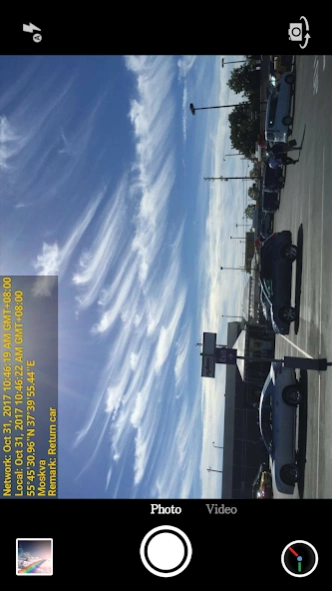
This app can add non-forged date, time, location and GPS watermark on photo and video. By getting the current time from the network, the photo and video will still have a real time watermark even if the user changes the...
This app can add non-forged date, time, location and GPS watermark on photo and video. By getting the current time from the network, the photo and video will still have a real time watermark even if the user changes the phone time.
This app can be used in a variety of occasions which need real time and location, such as the work report of the construction site , traffic accident scene, goods transfer, private detective work, evidence of borrowed items and so on.
The main features:
● Add the current date, time, GPS and address watermark when taking photo or video.
- Supports change font, font color, font size.
- Supports set timestamp in 7 positions: top left, top center, top right, bottom left, bottom center, bottom right,center.
- Supports auto add address and GPS.
- Supports input and display custom text on camera.
- Supports change opacity of text and text background.
● Supports import logo image to display on the camera. Can change the position, size, margins and transparency of the logo.
● Supports change video resolution.
● Supports power saving mode of black screen.
● Supports record video without audio.
● Can pause and continue record fragments to one video.
● Can toggle camera when recording.
● Supports portrait and landscape.
If you have any questions or suggestions, please email to
[email protected]. Thank you.
Previous Versions
Here you can find the changelog of Timestamp Camera Enterprise since it was posted on our website on 2019-10-29 20:40:06.
The latest version is and it was updated on 2024-04-22 13:18:17. See below the changes in each version.
Timestamp Camera Enterprise version
Updated At: 2024-04-15
Changes: - Bug fixes
Timestamp Camera Enterprise version 1.212
Updated At: 2022-10-07
Changes: - Fix "Open album is very slow when there are too many files"
- Fix "The custom text file can't be imported on some phones"
- Support "Import tags from txt file"
- Display tags in order of selection
- Fix "UI is incorrect in dark mode on some phones"
- Show tip if the video format is not supported
- Increase the distance between the banner and the navigation menu
- UI improvements
- Bug fixes
Timestamp Camera Enterprise version 1.199
Updated At: 2022-04-07
Changes: - Optimization of switching between photo and video modes
- Bug fixes
Timestamp Camera Enterprise version 1.195
Updated At: 2022-01-05
Changes: - Improve the quality of photo
- Fix the audio issue on Asus Rog Phone5
- Bug fixes
Timestamp Camera Enterprise version
Updated At: 2021-08-04
Changes: - Add the tags to metadata
- Support changing the interval of refreshing address
- Bug fixes
Timestamp Camera Enterprise version 1.183
Updated At: 2021-04-18
Changes: - Fix "Watermark will slightly shake when time changes"
- Support adding prefix to the file name
- Fix "The original photo does not appear in the system album"
- Add direction, altitude, speed to exif
- Add some address formats
- UI improvements and other bug fixes
Timestamp Camera Enterprise version 1.179
Updated At: 2021-01-15
Changes: - Compass improvements
- Bug fixes
Timestamp Camera Enterprise version 1.176
Updated At: 2020-09-01
Changes: - Fix "The photos taken in video mode sometimes are completely black"
- Can import and export the profile file to transfer the settings of this app between different phones
Timestamp Camera Enterprise version 1.172
Updated At: 2020-07-23
Changes: - Fix the bug that the compass direction is reverse when using the front camera
- Fix the bug that the size of the logo imported is wrong
Timestamp Camera Enterprise version 1.168
Updated At: 2020-06-10
Changes: - UI and performance improvements
- Can pass EXTRA_TEXT from other Apps as custom text
- Bug fixes
Disclaimer
Official Google Play Link
We do not host Timestamp Camera Enterprise on our servers. We did not scan it for viruses, adware, spyware or other type of malware. This app is hosted by Google and passed their terms and conditions to be listed there. We recommend caution when installing it.
The Google Play link for Timestamp Camera Enterprise is provided to you by apps112.com without any warranties, representations or guarantees of any kind, so access it at your own risk.
If you have questions regarding this particular app contact the publisher directly. For questions about the functionalities of apps112.com contact us.